Help and hints on using the site
Getting Started
If you have just arrived at the web site you may want to
read an introduction to the Sphakia Survey
to find out about the project and web site.
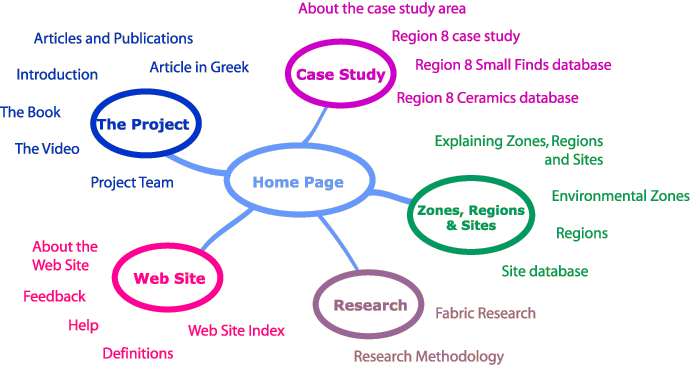
The diagram below is map of the site. Click on the map to
travel to a particular area (the new page will open in this window, but
to return here at any time use the question mark icon situated on each
page).
Navigation
 The
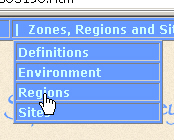
main way to find your way round this site is by using the menu bar at
the top of each page. Hold your mouse over the category you want to look
at and a drop down list of the pages within that category will appear.
To go to a particular page, click on the correct part of the menu's text.
In most recent web browser software the navigation bar will look like
the screenshot to the right of this text. In older browsers the menu will
appear the same but without the drop down lists. You will still be able
to find your way to all the pages in the site by going to the section
top pages allowed by the more limited menu. The
main way to find your way round this site is by using the menu bar at
the top of each page. Hold your mouse over the category you want to look
at and a drop down list of the pages within that category will appear.
To go to a particular page, click on the correct part of the menu's text.
In most recent web browser software the navigation bar will look like
the screenshot to the right of this text. In older browsers the menu will
appear the same but without the drop down lists. You will still be able
to find your way to all the pages in the site by going to the section
top pages allowed by the more limited menu.
As well as the navigation bar, which is there to help you find particular
areas of the web site, there is also a series of icons repeated to the
top left hand side of every page to help you use the site. The icons have
the following meanings:
 |
The arrow always takes you back to the last web page you looked
at in your browser window.
|
 |
The question mark icon will bring you back to this help page should
you have problems using the site or finding what you are looking
for.
|
 |
The house icon will take you to the site home page, from where
you will be able to get to any other part of the site
|
Images
 Most
of the images on this web site have been kept deliberately small to keep
page download times down. However, you should find that if you click on
almost any of the images in this site you will be taken to a page containing
a larger version of the image, and a caption to tell you more about it.
You can return to the page with small version of the image at any time
by clicking on the "previous page" link situated underneath
the caption. If you want to you can try this out using the image to the
right of this text. Most
of the images on this web site have been kept deliberately small to keep
page download times down. However, you should find that if you click on
almost any of the images in this site you will be taken to a page containing
a larger version of the image, and a caption to tell you more about it.
You can return to the page with small version of the image at any time
by clicking on the "previous page" link situated underneath
the caption. If you want to you can try this out using the image to the
right of this text.
Databases
There are three databases that can be searched from this site. Each one
contains very different fields and records, and so we have written separate,
detailed guidelines to help you search each one. You can go direct to
the database help information from this page,
or on each of the database search interfaces look for the  symbol. symbol.
|